> ## Documentation Index
> Fetch the complete documentation index at: https://help.emergent.sh/llms.txt
> Use this file to discover all available pages before exploring further.
# Forking In Emergent
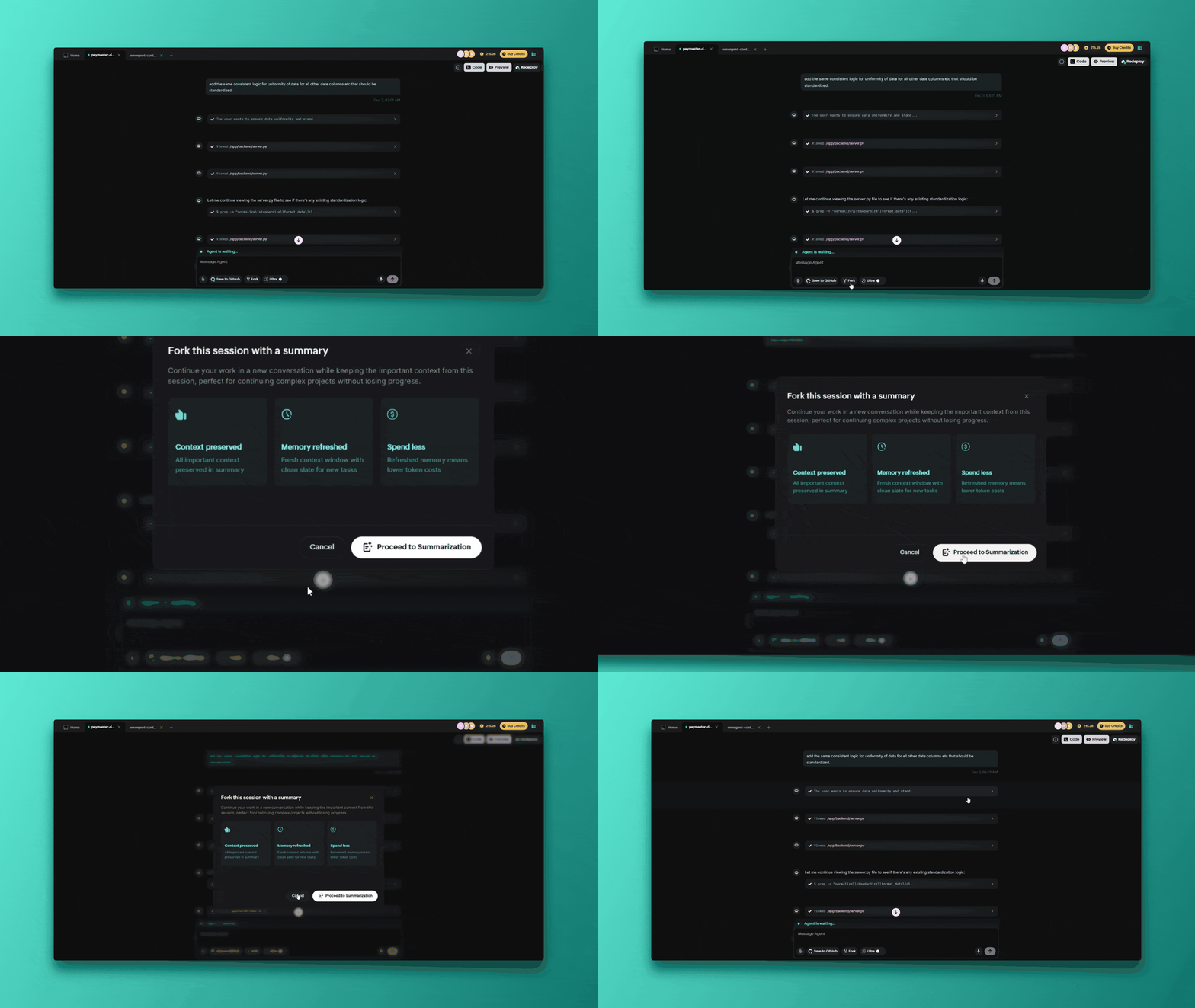
**Chat forking** is Emergent's intelligent solution to context limit challenges. It allows seamless project continuation in a fresh chat while preserving all essential context when your conversation approaches the 200,000 token limit.
 ## **How Forking Manages Memory Context**
### **The Core Problem**
All AI agents have limited token context windows (like limited memory). Complex development sessions consume this through:
* Detailed code discussions
* Multiple iterations and refinements
* Extensive debugging sessions
* Feature additions and modifications
### **Intelligent Context Preservation Strategy**
**What Gets Preserved:**
1. Project goals and requirements
2. Architectural decisions and reasoning
3. Current codebase and file structure
4. Key implementation details
5. Recent changes and their context
6. Outstanding tasks and planned features
7. Important constraints and considerations
**What Gets Compressed/Removed:**
1. Exact conversation history (replaced with intelligent summary)
2. Detailed debugging logs (unless currently relevant)
3. Exploratory discussions that didn't impact final code
4. Redundant or superseded information
## Triggers for Forking
### **Automatic Forking Scenarios**
* **Context Limit Warning**: System displays warnings as you approach the token limit
* **Performance Degradation**: Slower response times indicate context strain
Forking becomes necessary near the 200,000 token limit - Emergent has built-in warnings to fork as well as a seamless transition built into the system.
### **Manual Forking Options (Strategic)**
* **Major Transitions**: Fork when moving between major features or phases
* **Experimentation**: Fork to try different approaches while preserving main thread
* **Organization**: Fork to keep different development aspects separate
Pro Tip: Save your project to GitHub before you fork manually too!
For a detailed walkthrough on where to fork and how the steps look, please refer to this [video](https://screen.studio/share/olXa5dnT?state=uploading).
## **How Forking Manages Memory Context**
### **The Core Problem**
All AI agents have limited token context windows (like limited memory). Complex development sessions consume this through:
* Detailed code discussions
* Multiple iterations and refinements
* Extensive debugging sessions
* Feature additions and modifications
### **Intelligent Context Preservation Strategy**
**What Gets Preserved:**
1. Project goals and requirements
2. Architectural decisions and reasoning
3. Current codebase and file structure
4. Key implementation details
5. Recent changes and their context
6. Outstanding tasks and planned features
7. Important constraints and considerations
**What Gets Compressed/Removed:**
1. Exact conversation history (replaced with intelligent summary)
2. Detailed debugging logs (unless currently relevant)
3. Exploratory discussions that didn't impact final code
4. Redundant or superseded information
## Triggers for Forking
### **Automatic Forking Scenarios**
* **Context Limit Warning**: System displays warnings as you approach the token limit
* **Performance Degradation**: Slower response times indicate context strain
Forking becomes necessary near the 200,000 token limit - Emergent has built-in warnings to fork as well as a seamless transition built into the system.
### **Manual Forking Options (Strategic)**
* **Major Transitions**: Fork when moving between major features or phases
* **Experimentation**: Fork to try different approaches while preserving main thread
* **Organization**: Fork to keep different development aspects separate
Pro Tip: Save your project to GitHub before you fork manually too!
For a detailed walkthrough on where to fork and how the steps look, please refer to this [video](https://screen.studio/share/olXa5dnT?state=uploading).