> ## Documentation Index
> Fetch the complete documentation index at: https://help.emergent.sh/llms.txt
> Use this file to discover all available pages before exploring further.
# Pre-Deployment Health Check
This is a handy feature built specifically to effectively use your credits and ensure your deployment goes smoothly.
The **Pre-Deployment Health Check** is an **automated code review system** built directly into Emergent's deployment interface. It's a checkbox feature that runs before your app deploys to catch potential problems.
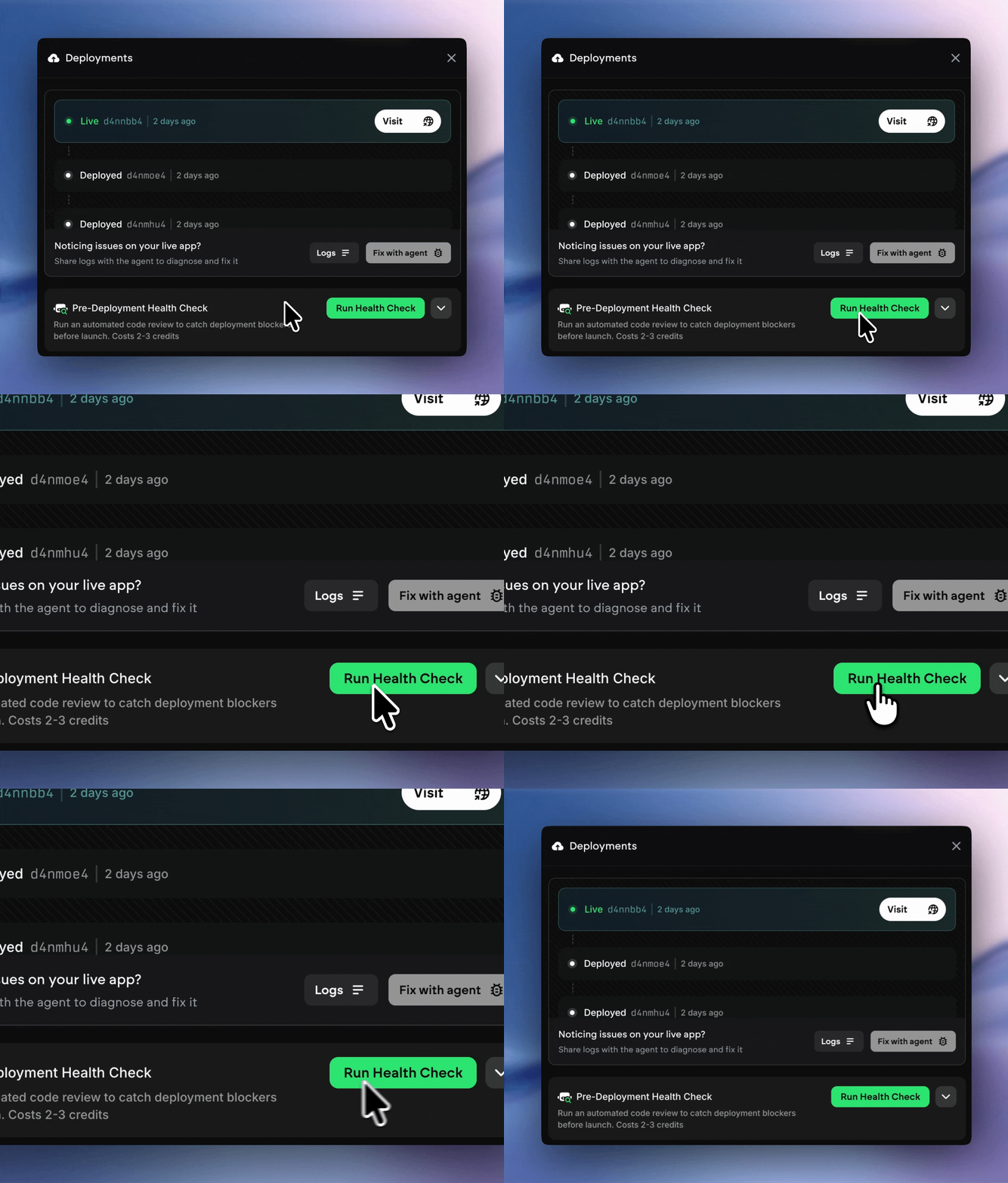 ## **What It Does**
Here's the brief rundown of what this feature actually does:
**Automated Code Review:**
**Key Features:**
* **Automated**: Runs without manual intervention
* **Pre-emptive**: Catches issues BEFORE deployment
* **Comprehensive**: Reviews code for deployment blockers
* **Cost-effective**: Only costs 2-3 credits
Here's a [video](https://screen.studio/share/oT6siuxC?state=uploading) that shows you what the expected flow of steps and events looks like for this feature.
## How to Interpret Results
### All Green = Passed
Status: READY TO DEPLOY
What this means:
* No deployment blockers found
* Configuration looks good - Dependencies are properly set up
* Safe to proceed with deployment
Next Steps:
* Optionally run Preview to test functionality
* Click Deploy with confidence!
### Warnings = Proceed With Caution
Status: WARNINGS FOUND
What this means:
* No critical blockers - only recommended improvements
* Deployment is likely to succeed - may have edge cases where production issues crop up
Next Steps:
* Review warnings
* Decide if you wish to deploy now (Ask the agent if the errors are potential blockers)
### Critical Issues Found = Do Not Deploy
Status: DEPLOYMENT BLOCKERS FOUND
What this means:
* Issues that will cause deployment to fail
* Must be fixed before deploying
Next Steps:
* Fix each critical issue listed
* Run health check again
* Only deploy after all critical issues are resolved
Once you use the tool a few times, you will learn what issues are likely to crop up for what kind of apps - and solve for them way ahead of them occuring.
## **What It Does**
Here's the brief rundown of what this feature actually does:
**Automated Code Review:**
**Key Features:**
* **Automated**: Runs without manual intervention
* **Pre-emptive**: Catches issues BEFORE deployment
* **Comprehensive**: Reviews code for deployment blockers
* **Cost-effective**: Only costs 2-3 credits
Here's a [video](https://screen.studio/share/oT6siuxC?state=uploading) that shows you what the expected flow of steps and events looks like for this feature.
## How to Interpret Results
### All Green = Passed
Status: READY TO DEPLOY
What this means:
* No deployment blockers found
* Configuration looks good - Dependencies are properly set up
* Safe to proceed with deployment
Next Steps:
* Optionally run Preview to test functionality
* Click Deploy with confidence!
### Warnings = Proceed With Caution
Status: WARNINGS FOUND
What this means:
* No critical blockers - only recommended improvements
* Deployment is likely to succeed - may have edge cases where production issues crop up
Next Steps:
* Review warnings
* Decide if you wish to deploy now (Ask the agent if the errors are potential blockers)
### Critical Issues Found = Do Not Deploy
Status: DEPLOYMENT BLOCKERS FOUND
What this means:
* Issues that will cause deployment to fail
* Must be fixed before deploying
Next Steps:
* Fix each critical issue listed
* Run health check again
* Only deploy after all critical issues are resolved
Once you use the tool a few times, you will learn what issues are likely to crop up for what kind of apps - and solve for them way ahead of them occuring.